
Have you ever photographed a beautiful flower, only to discover the background was so busy it distracted from the flower itself? Or perhaps you’ve photographed someone you love and wished you could soften everything behind them. Learning how to use Aperture Mode can help you do both! It’s one of my favorite camera settings because it gives you creative control over what your viewers notice first.
Last week, I introduced you to three camera settings for creative control: aperture, shutter speed, and ISO. I promised we’d explore each one individually, starting with Aperture Mode. Today, we’ll look at how it works, when to use it, and how a simple change in your camera settings can make a big difference in your images.
How to Use Aperture Mode on Your Camera

Imagine you’re photographing a friend sitting at an outdoor café. She’s smiling, the light is beautiful, and you take the picture. But when you look at it, you notice the people at the next table, cars passing in the street, and a bright sign behind her. They’re all competing for attention! Wouldn’t it be wonderful if you could soften that distracting background and make your friend the star of the image?
Aperture Mode can help you do that! Aperture is the opening inside your lens that allows light to reach your camera’s sensor. By making that opening wider or narrower, you can control how much of your photograph appears sharp. Photographers call this depth of field. A wide aperture can create a beautifully blurred background, while a narrow aperture can help keep more of the scene in focus.
If you have a DSLR or mirrorless camera, look for A (Nikon, Sony and more) or Av (Canon) on your Mode Dial. When you select Aperture Mode, you choose the aperture setting, and your camera automatically selects a shutter speed to help give you a properly exposed photograph. You make the creative decision, while your camera handles another important setting.
I shot the image above of my daughter in Paris, using my Canon DSLR, Aperture Mode, f/2.8. That blurred out the crowds behind her.
Understanding Those Confusing f/Stop Numbers
Aperture settings are written as f/stop numbers, such as f/2.8, f/5.6, f/8, and f/16. And here’s the part that confuses almost everyone at first: a small f/stop number means a wide opening, while a large f/stop number means a narrow opening.
This is true for all cameras, even an iPhone 18 Pro or newer! And here’s a math tip from middle school: See the slash after the letter “f?” That indicates that f/stops are actually fractions. When I taught photography classes in person, I’d hold up 2 measuring cups: a ¼ cup and a ½ cup and ask which one was larger. That’s right-the ½ cup is larger, but the number after the slash is smaller! Keep that demonstration in your mind, and it will all make sense! 😉
But what do the different f/stops do? A wide aperture, such as f/2.8, allows more light into your camera and can create a shallow depth of field, with your subject sharp and the background softly blurred. A narrow aperture, such as f/11, lets in less light and creates a greater depth of field, keeping more of the scene sharp.
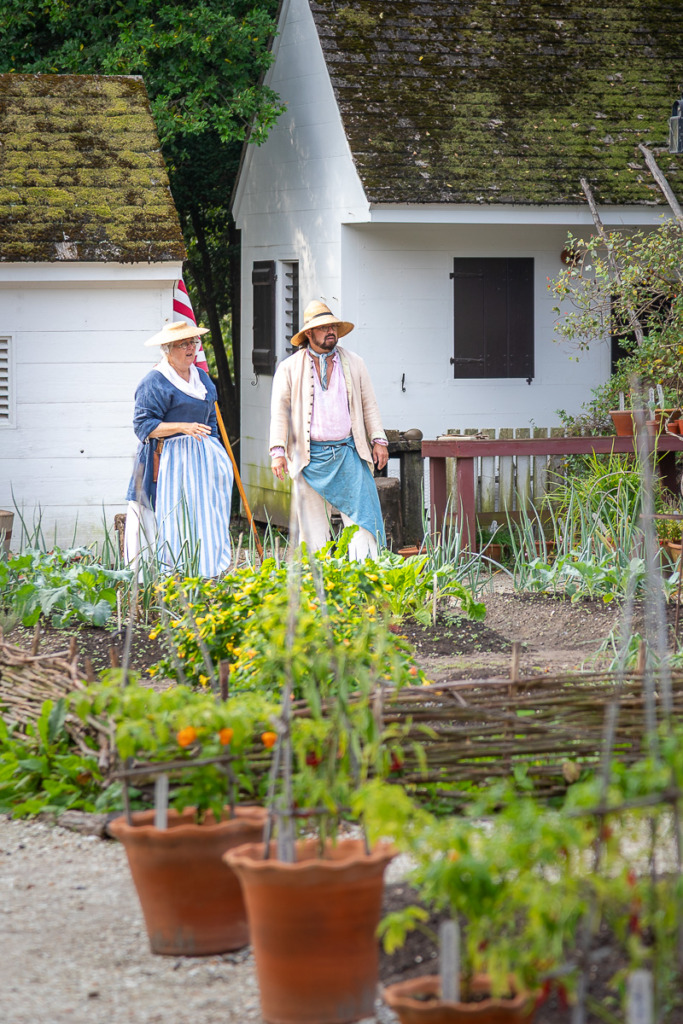
The image above is from a garden in Colonial Williamsburg, in Williamsburg, Virginia. The subject was the two interpreters, so I Shot in Aperture Mode, f/4.0 and focused on them. That blurred out the plants in the foreground. Did you even notice those plants?
But because it’s never that simple… the exact results also depend on your lens and the distances between your camera, subject, and background. Remember that fact if you run into problems trying to create the scene. I’ll explain more below.
How to Use Aperture Mode to Blur Backgrounds
Now that you understand the basics of how to use Aperture Mode, let’s look at how to put it to work. You might be surprised to discover that your aperture setting isn’t the only thing that affects background blur!
First, take a look at the top photo of my husband, Skip. He kindly posed next to a tree to demonstrate that while the background is out of focus, the tree is sharp-it’s the same distance from the camera! Captured in Aperture Mode, f/2.8, with the focus on Skip.
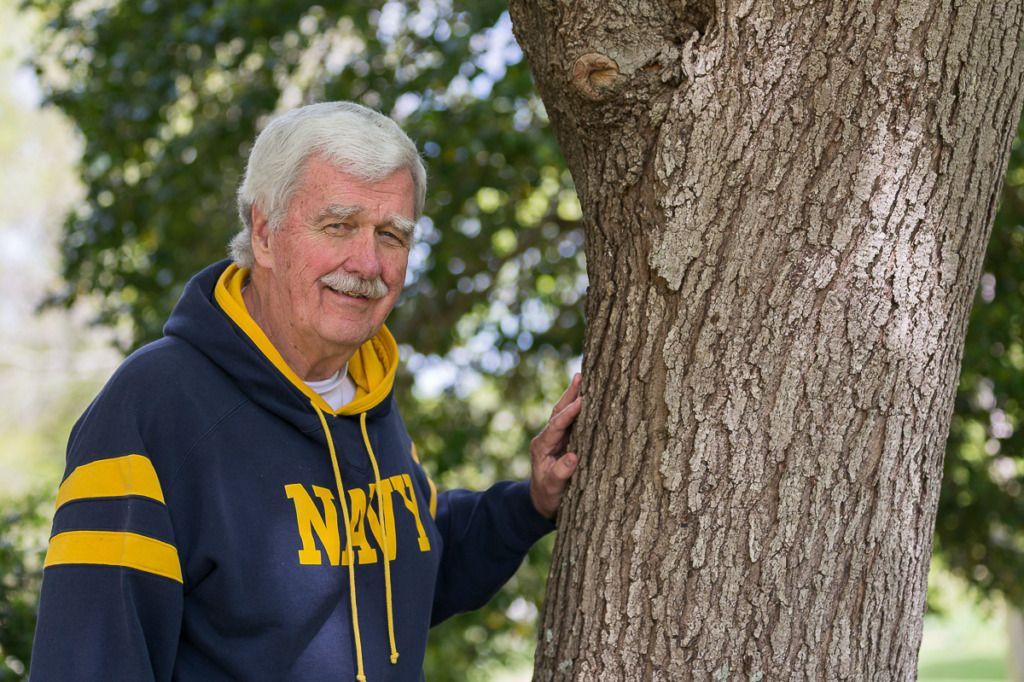
Now look at the second photo of Skip. I still focused on him. And used the same mode and f/stop number. And I was still the same distance from him, because we both stepped back the same number of steps. But look at the tree! It’s now out of focus. That’s the effect that relative distance can have on depth of field!

So here’s what to do.
First, choose a wide aperture. Start with the smallest f/stop number your lens allows, perhaps f/2.8 or f/4. Focus carefully on your subject and take a photograph. This works beautifully for portraits, flowers, pets, and wildlife. If you’re photographing a rose in your garden, for example, a wide aperture can help soften the surrounding leaves and branches so the rose becomes the center of attention. (Using an iPhone camera? Be sure to tap on the screen to focus on the flower!)
Second, move closer to your subject. Even if your lens doesn’t have a particularly wide aperture, moving closer can help blur the background. Try photographing a flower from several feet away, then move closer and take another photograph using the same aperture. You’ll often notice that the background becomes softer. Just remember that every lens has a minimum focusing distance, so don’t move so close that your camera can no longer focus.
Third, increase the distance between your subject and the background. Imagine photographing someone standing directly in front of a brick wall. Even with a wide aperture, the wall may remain recognizable. Now ask your subject to move several feet away from the wall and take another photograph, adjusting your position to keep approximately the same framing. The background will often look much softer. This is a simple technique that can make an enormous difference in your portraits.
When Would You Want More of Your Photo to Be Sharp?
Of course, blurry backgrounds aren’t always what we want! Imagine standing on a hillside overlooking a beautiful landscape, with wildflowers in the foreground, rolling hills in the distance, and mountains along the horizon. You probably want as much of that scene as possible to appear sharp.
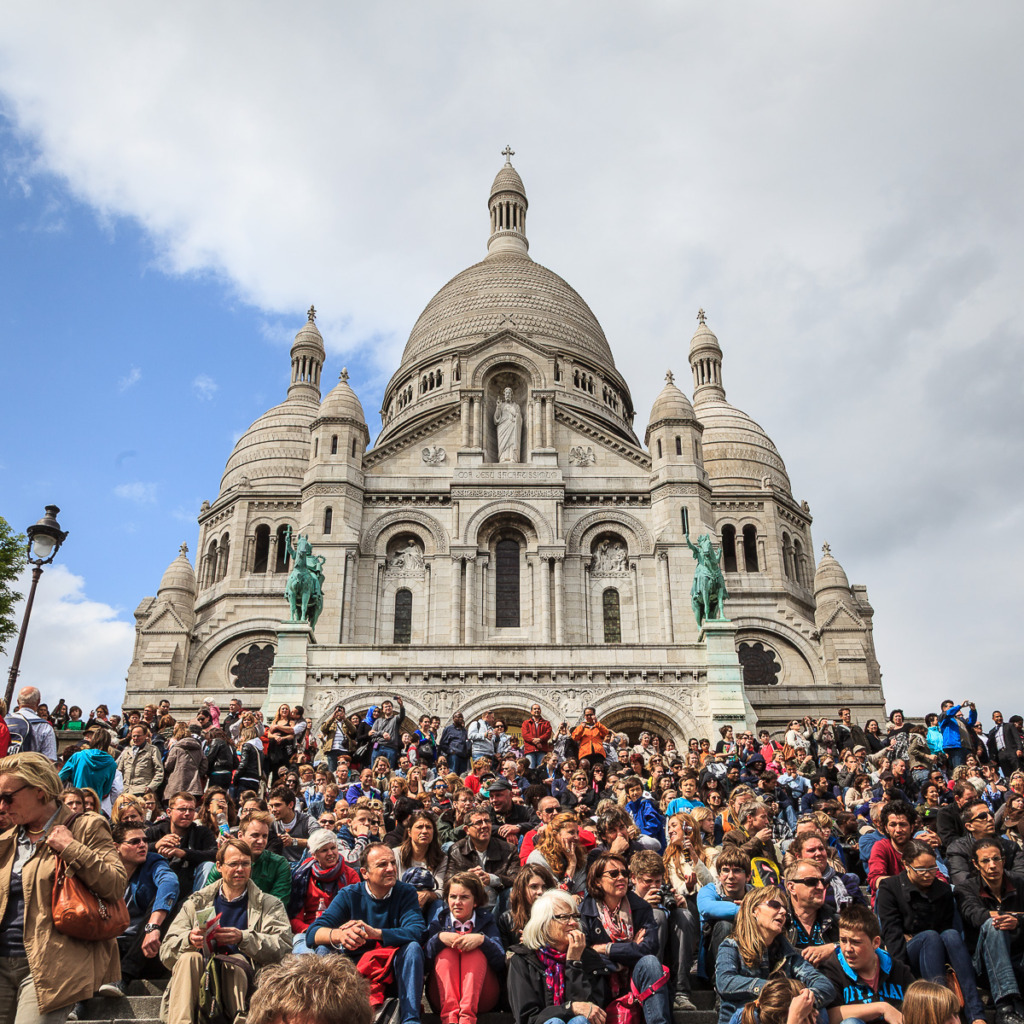
Or you might be looking up at Sacré-Cœur in Paris and want to show the huge crowd of tourists sitting on the steps and looking downhill at the city.
This is when a narrower aperture, such as f/11 or f/14, can be especially useful. It increases your depth of field, helping you capture details throughout the scene. You might also choose a narrower aperture when photographing a group of people arranged in several rows, so the people in the back have a better chance of appearing sharp along with those in front.
One thing to keep in mind is that narrowing your aperture lets less light into the camera. To compensate, your camera may choose a slower shutter speed, which could lead to blurry photographs if you’re handholding the camera. We’ll explore that problem next week when we talk about Shutter Mode.
What About Aperture on Your iPhone?
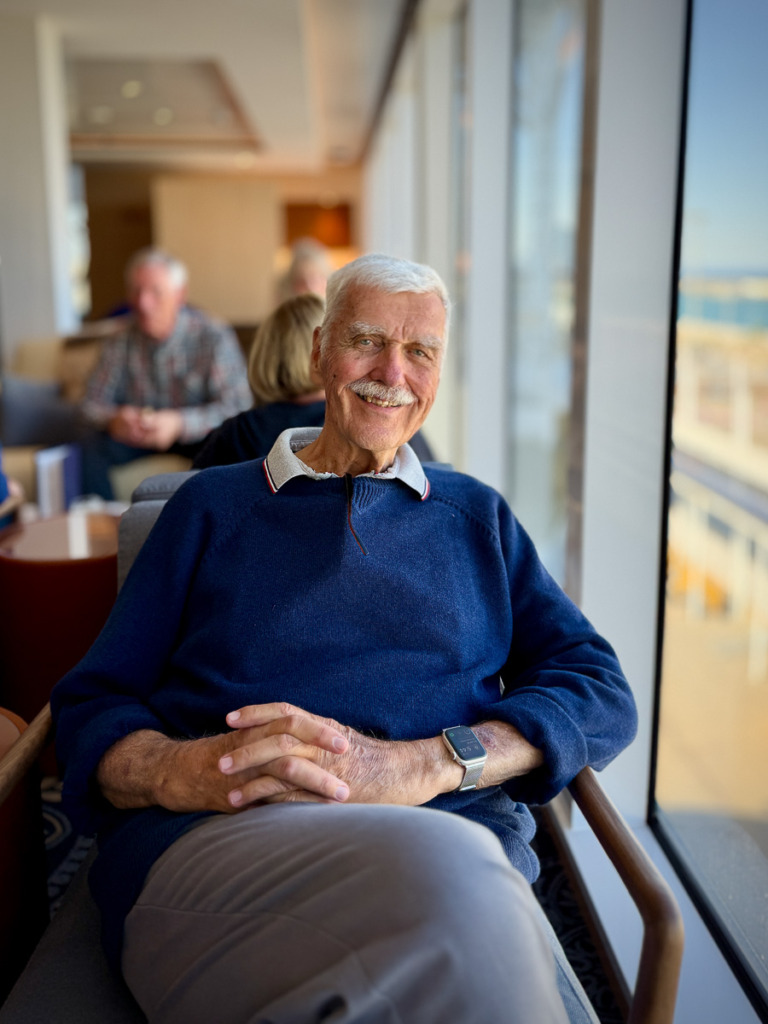
If you use an iPhone camera, you can experiment with depth of field, too! On compatible iPhones, Portrait mode uses computational photography to create the appearance of a softly blurred background. You can even adjust the simulated depth of field afterward in the Photos app.
I captured this image of Skip on the Viking Mira with my iPhone 17 Pro Max, using Portrait Mode.
And two of the techniques we’ve discussed work with your iPhone’s regular Camera mode as well. Try moving closer to your subject or increasing the distance between your subject and the background. You may be surprised by how much difference these simple changes make, even without Portrait mode.
And, cue the applause! The iPhone 18 Pro, Pro Max and newer models have a physical aperture that you can change! The numbers don’t vary as much as on a DSLR, so remember that lower numbers let in more light and create a shallower depth of field.
Remember to tap the screen to choose your focus point!
Now It’s Your Turn
This week, it’s time to experiment with Aperture Mode. Find something that will stay still while you practice, such as a flower, a coffee mug, or a small decoration. Make sure there’s something in the background, preferably several feet behind your subject. (And if the light is good, you can also try this with a moving subject, like the sailboat at the very top of the post. Shot in Aperture Mode, f/2.8, with my Canon DSLR in Paris.)
Set your DSLR or mirrorless camera to A or Av and choose the widest aperture your lens allows. Take a photograph, then change your aperture to f/8 or f/11 and take another without moving your camera. Compare the two images, paying particular attention to the background. Which do you prefer? And why?
If you’re using an iPhone, try photographing the same subject in regular Photo mode and Portrait mode, then compare the results. (Yes, you can use Portrait Mode even with a flower! Just be sure to tap on the screen to set the focus.) You can also experiment with the depth-of-field adjustment in the Photos app.
The more you experiment, the more you’ll begin to recognize situations where controlling depth of field can improve your images. And that’s really what learning your camera settings is all about: giving yourself more creative choices.
Next week, we’ll explore Shutter Mode and discover how to freeze action or intentionally blur movement.
And if you’re ready to learn more about using your DSLR or mirrorless camera, my Camera Mechanics Workshop covers Aperture, Shutter, Program, and Manual modes in greater detail.
And iPhone Photography Made Easy is the quick way to learn to use your iPhone camera! One technique I teach is how to use the regular camera mode, along with focus, to take portraits of everyday objects without using Portrait Mode.
Hope you’ll join one of my online classes! Happy photographing! 📷 📱

You might also like

Leave a reply